
Where we started: a VM, Docker Compose, and plenty of goodwill
For years our internal development environment lived on a single virtual machine — sturdy on paper, but increasingly worn out in practice. Docker ran on top of it, and everything — and I mean everything — started with a docker compose up -d inside each project's folder. It worked. It worked for quite a while, in fact.
Then the projects grew. LoginMaster, Data Alchemy, Jarvis, plus a whole host of supporting services: gateways, development databases, brokers, parsing engines, frontends in various stages of refactoring. At full tilt we ended up with around 60 containers running at once, peaking at 80 whenever someone branched off a heavy feature or was testing a new microservice.
And that's where the trouble began.
The symptoms of decay
Anyone who has lived with an environment like this recognizes them instantly. The warning signs are always the same:
- Stale images piling up like dust. Every rebuild left behind dangling layers, images tagged
<none>, old versions nobody dared delete “just in case we need it.” A weeklydocker system prunehad become a ritual, but it wasn't enough: developers built throughout the day and the VM filled up regardless. - Resources eaten up with no rhyme or reason. No serious per-container limits, no QoS. One slightly touchy Java container or a parser stuck in a loop was all it took to slow everything else down. We learned the phrase “noisy neighbor” the hard way, taking it on the chin again and again.
- A messy environment. Docker networks multiplying, orphaned volumes, ports randomly mapped on the host to avoid collisions,
docker-compose.override.ymlfiles holding everyone's personal configurations. Onboarding a new colleague: a solid two days of “but it doesn't start on my machine.” - Zero parity with production. Our production runs on Scaleway, on managed Kubernetes, with everything that entails: HPA, network policies, native secrets, ingress controller, observability. In development, instead, we had Docker Compose and nothing more. The classic “it works on my VM” that turns into “not in production.”
The point isn't that Docker Compose is the wrong tool — it's excellent at what it was built for. The point is that we were using it to do an orchestrator's job, and at a certain point the toy breaks.
Kubernetes in-house, aligned with production
Production runs on Scaleway (and we're very happy with it — a European provider gives us data sovereignty guarantees you simply don't get with American hyperscalers, and for our Italian enterprise clients that carries real weight). What we wanted, though, was an on-premise development cluster, integrated with our existing vSphere and with the storage we already had in-house.
Three non-negotiable requirements:
- Alignment with production: same APIs, same manifests, same operational patterns.
- Real autoscaling: both at the pod level (HPA) and at the node level (a cluster autoscaler that spins up new VMs on vSphere when needed).
- Minimal maintenance: we didn't want another full-time job. The team is about ten people; we can't afford a dedicated Kubernetes sysadmin.
That's what led us to choose Talos OS as the operating system for the nodes.
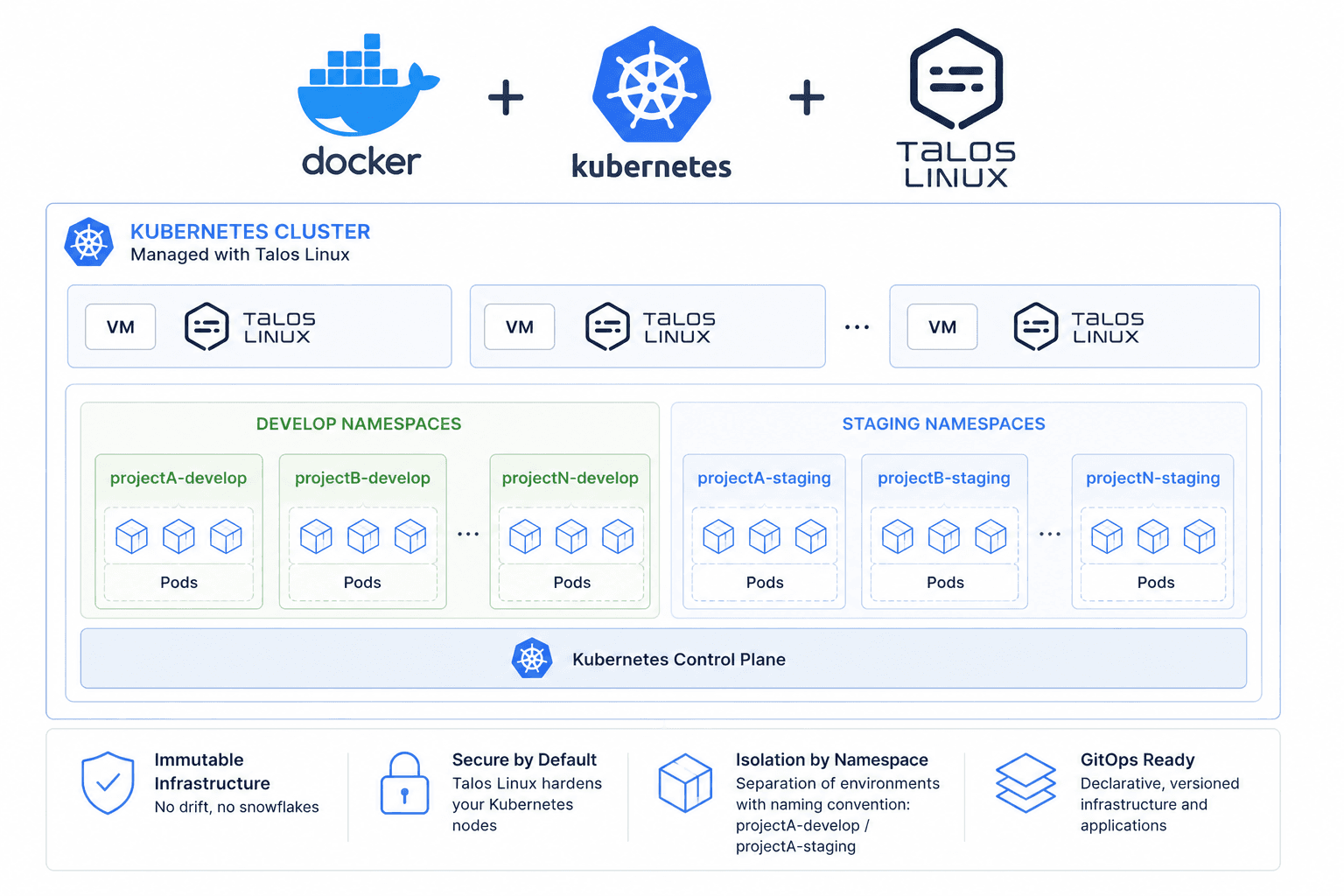
Why Talos
Talos is a minimal, immutable Linux designed solely to run Kubernetes. No shell, no SSH, no packages to update by hand. All configuration goes through a gRPC API and version-controlled YAML files. For anyone coming from the “let's log in and fix it by hand” world it's a culture shock; for anyone who has already suffered the consequences of those “let's fix it by hand” moments, it's pure liberation.
Practical benefits we experienced firsthand:
- Minimal attack surface. No extra services, no open ports you don't need.
- Declarative upgrades. Update a field in the config, apply it, and the node reinstalls. Done.
- Fast boot. A Talos VM is ready in a few seconds, which is essential when the cluster autoscaler needs to add capacity.
- Zero friction with vSphere. The official Talos OVAs import into vSphere without any strange workarounds, and the integration with Kubernetes' vSphere cloud provider works out of the box.
The vSphere integration
The cluster is natively exposed to vSphere thanks to the vsphere-cloud-provider and the vsphere-csi-driver. This means two things:
- Real persistent storage. The
PersistentVolumeClaimobjects automatically turn into VMDKs on our datastores. No morebind mounton paths that varied from machine to machine. Different storage classes for different workloads: SSD for the development databases, capacity HDD for logs and build artifacts. - Node autoscaling. When the HPA scales the pods and the existing nodes aren't enough, the cluster autoscaler talks to vSphere and brings up a new Talos VM already configured to join the cluster. When the load drops, the excess VMs are powered off and removed. All without anyone opening the vSphere console.
For anyone coming from the Compose world, this is the moment the “ah, there's the difference” clicks. It's no longer “I have a machine, I fill it until it holds.” It's “I have an elastic pool of capacity, and Kubernetes uses it as it needs to.”
How developers' work changed
One important clarification, because whenever Kubernetes comes up people assume developers have to learn a whole new trade: not much changed for them at the local level.
On every developer's machine, for every project, there's still its trusty docker-compose.yml with its trusty .env. When you work on a feature, you bring up the services you need, run your development loop, commit. We didn't touch this because it works beautifully for the fast cycle of people writing code. There's no reason to force a frontend developer to write Kubernetes manifests just to run a Vite dev server.
The leap happens starting from the integrated dev environment, the shared one — the one those 60–80 containers ran on. There we moved to the Talos cluster, and with it changed how we manage configuration and secrets:
- No more
.envfiles lying around on a shared VM. All development credentials live in KubernetesSecretobjects, synced with a vault and rotatable without having to redo the deployment by hand. ConfigMapfor non-sensitive configuration. Endpoints, feature flags, tuning parameters: all version controlled, all reviewable in a pull request.- Namespaces per project and per branch. Every important feature branch can have its own ephemeral namespace, with its own subset of services, isolated from the others. When the branch is merged or closed, the namespace is destroyed and with it all of its resources. Goodbye ghost containers.
- Manifests identical to production. Same Helm chart, same base values, only per-environment overrides. When something works in dev, it has an extremely high chance of working in production on Scaleway. And when something doesn't work in production, we can reproduce the problem in dev without inventing anything.
Concrete benefits
Let me try to sum up without any romanticism, because “it used to be worse” is easy and the numbers are more honest:
Time to onboard a new developer onto the integrated environment: from about two days to a few hours. The cluster is there, it does what it says on the tin, and there's no need to rebuild a personal house of cards.
“VM full” incidents: effectively down to zero. Storage is sized by class and the nodes multiply when needed.
Dev/prod drift: reduced to acceptable margins. Surprises at deploy time still happen, but they're no longer structural.
Security: secrets management has moved out of emails and
.envfiles passed around in chat. That alone, from a GDPR and enterprise-client-requirements standpoint, is worth the price of admission.
Wrapping up...
Three things to take home if you're in the situation we were in six months ago.
First: Docker Compose is not the enemy. The enemy is using it for a job that isn't its own. For the local development loop it remains perfect, and we have no intention of taking it away from developers. It's when you use it as an orchestrator for a shared environment with dozens of services that it starts to creak.
Second: choosing the right operating system for the nodes is life-changing. Talos OS removed an entire category of problems for us — the “someone did something on the node and nobody knows what” kind. Immutability isn't a fad, it's operational hygiene.
Third: dev/prod alignment is paid for now or paid for later. Having the same orchestrator in development and in production costs something in initial setup. Not having it costs much more, every single day, in strange bugs, anxiety-inducing deploys and eroded trust in the process.
If you too are staring at your docker compose ps with that slightly resigned look on your face, know that there's a way out. And you can do it without selling your soul to an American hyperscaler.
P.s. Thanks Claude for helping me draft this article — you turned one handwritten page into a structured piece.
Want to rebuild your development environment with Kubernetes?
Codebaker designs and manages Kubernetes infrastructures on European cloud (Scaleway) and on-premise (vSphere + Talos OS). If you want to assess migrating your dev environment or your production, let's talk.
Contact us